Choose portable outdoor speakers that suit your space, connect them to a phone or other audio source, and set them up for clear sound and safe use. This guide is for beginners buying or using a battery-powered Bluetooth speaker outside. Allow 20–40 minutes for comparison and setup; actual shopping time varies.

Get sports gear delivered free with Prime
- Fast, free delivery on millions of items
- Prime Video, Amazon Music and more included
- Member-only deals all year

Soundcore Boom 2 by Anker, 80W Outdoor Bluetooth Speaker, 24H Playtime
- ✔ Claimed output: 80W
- ✔ Battery life: Up to 24 hours; varies by volume and content
- ✔ Water protection: IPX7; floatable design

JBL Charge 6 – Portable Waterproof & DropProof Bluetooth Speaker (Black)
- ✔ Water and dust protection: IP68; stated freshwater test up to 1.5 meters for 30 minutes
- ✔ Drop protection: Up to 1 meter onto concrete, per product description
- ✔ Battery life: Up to 24 hours, plus up to 4 hours with Playtime Boost

Anker soundcore 2 Portable Bluetooth Speaker, 24-Hour Playtime, IPX7
- ✔ Output: 12W
- ✔ Drivers: Dual neodymium drivers
- ✔ Battery life: Up to 24 hours
Difficulty: Beginner | Time: 20–40 minutes
What You’ll Need
Tools & Materials:
- Phone, tablet, or other Bluetooth audio source
- Portable speaker and its charging cable
- Access to a suitable power outlet for charging
Knowledge:
- Basic phone Bluetooth controls
- Ability to check product specifications and manufacturer instructions
Decide where you will use the speaker, how many people need to hear it, and whether you need one speaker or a pair. Check the maker’s guidance for charging, water resistance, and operating limits. Water resistance does not mean the speaker is safe to submerge or leave exposed to every kind of weather.
Soundcore Boom 2 by Anker, 80W Outdoor Bluetooth Speaker, 24H Playtime
The Soundcore Boom 2 is the strongest all-around match here for a backyard, campsite, or poolside group that wants music to feel substantial outdoors. Its listed 80W output, dedicated four-inch subwoofer, and BassUp 2.0 are aimed at fuller, punchier sound than the Soundcore 2’s 12W dual-driver setup. That extra emphasis makes the Boom 2 the more convincing pick when people are spread around a space and a small speaker would feel thin.It also bundles practical details that matter away from an outlet: up to 24 hours of playtime, a built-in power bank, USB-C, and a floatable IPX7 design. Floatability is a useful distinction from the Charge 6, whose supplied information describes waterproof, dustproof, and drop-proof construction but does not say that it floats. The Boom 2’s app-based Pro EQ gives us more control over its sound, and RGB lighting adds atmosphere if that feature appeals to us.There are tradeoffs. The Boom 2’s larger, bass-oriented design is less compelling if our priority is a speaker that disappears into a day bag; the Soundcore 2 is the simpler portability choice. Its advertised 24-hour endurance varies with volume and content, and brighter, louder playback can reduce runtime. IPX7 protection and floatability also do not mean we should leave it submerged or ignore care after exposure to water. For outdoor sound with useful extras, though, it offers the broadest set of reasons to choose it.
Pros:
- Dedicated subwoofer and BassUp 2.0 target fuller low-end sound than the Soundcore 2.
- Floatable design and IPX7 water protection suit pool and beach outings.
- Built-in power bank can help keep a phone charged away from an outlet.
- Pro EQ customization and RGB lighting add options for changing the sound and atmosphere.
Cons:
- Its bass-focused, higher-output design is more speaker than minimal packers may want.
- The up-to-24-hour battery claim varies with volume and audio content.
- RGB lighting and app controls may add little for buyers who want only basic playback.
Best for: People who want fuller bass and phone charging for poolside, campsite, or backyard listening.
Not ideal for: Buyers who want the smallest, simplest speaker to pack or do not need party-oriented bass and lighting.
Bottom line: Choose the Boom 2 for the most complete outdoor mix of punchy sound, floatable protection, and useful charging extras.
“Choose the Boom 2 for the most complete outdoor mix of punchy sound, floatable protection, and useful charging extras.”
JBL Charge 6 – Portable Waterproof & DropProof Bluetooth Speaker (Black)
For trips where a speaker may get dusty, wet, or knocked around, the JBL Charge 6 has the most clearly described ruggedness in this group. Its IP68 rating covers dust and water under the stated lab conditions, and JBL says it can withstand a drop from up to one meter onto concrete. The removable handle strap also gives us a convenient way to carry it from the car to a picnic spot. Those details make it a stronger fit for rougher transport than the Soundcore 2, whose listed protection is IPX7 and whose supplied details do not specify drop protection.JBL adds a built-in power bank, app-based sound controls, and Auracast multi-speaker connection. If we own compatible JBL speakers, Auracast can help expand coverage; it is a different system from Soundcore’s wireless stereo pairing, so we should not assume the products connect across brands. JBL also claims up to 28 hours with Playtime Boost, including an extra four hours beyond its 24-hour figure, and says a ten-minute charge can provide up to 150 minutes of playback. These are useful escape hatches when an outing runs long, though actual results depend on conditions.Compared with the Boom 2, the Charge 6 leans more on protection and carrying flexibility than on a disclosed subwoofer or headline output figure. The supplied product details do not state a wattage, so buyers who want to compare output directly should look for verified specifications before deciding. It also does not list floatability, and its charging cable is not included. Choose it when durability, the strap, and JBL ecosystem links count more than the Boom 2’s more explicit bass hardware and floatable design.
Pros:
- IP68 rating covers dust and water under the stated lab conditions.
- Designed to withstand a drop from up to one meter onto concrete.
- Removable strap helps with carrying between the car and an outdoor spot.
- Power bank, Auracast, and claimed fast charging add practical flexibility.
Cons:
- The supplied details do not state speaker wattage or a dedicated subwoofer specification.
- Floatability is not listed, unlike the Boom 2.
- A USB-C charging cable is not included.
Best for: Outdoor listeners who prioritize dust and drop protection, a carry strap, and a phone-charging power bank.
Not ideal for: Buyers who specifically need a floatable speaker or want a stated output and subwoofer specification to compare.
Bottom line: Pick the Charge 6 when dust, drops, and a carry strap matter more than floatability or a clearly stated bass and output setup.
“Pick the Charge 6 when dust, drops, and a carry strap matter more than floatability or a clearly stated bass and output setup.”
Anker soundcore 2 Portable Bluetooth Speaker, 24-Hour Playtime, IPX7
The Soundcore 2 is the straightforward pick for casual outdoor listening: familiar button controls, stereo playback, and a portable design without the Boom 2’s party-focused feature set. Its listed 12W output comes from dual neodymium drivers, with BassUp and a spiral bass port intended to add low-end weight. That gives it more bass support than a bare-bones tiny speaker, but it is a more modest setup than the Boom 2’s dedicated subwoofer and 80W claim.For a solo picnic, a campsite soundtrack at moderate volume, or music while doing chores outside, its simplicity can be an advantage. The manufacturer lists up to 24 hours of playtime and IPX7 water protection, so the basics are covered for long days and splashes. Wireless stereo pairing is available if we want to connect another compatible speaker. Compared with the Charge 6, however, Soundcore 2 does not list dust or drop protection, a removable carry strap, or a built-in phone power bank.This is the model to choose when we value uncomplicated operation and a smaller speaker over broader outdoor capability. It is less suited to a noisy group or a wide open space where stronger output and fuller sound help the music carry. The listed Bluetooth range is 20 meters, shorter than the 100-meter figures supplied for the other two models, though real-world range depends on surroundings and devices. Battery life is also a maximum claim rather than a promise at every volume. For larger gatherings, we would step up to the Boom 2; for tougher handling and more charging options, the Charge 6 makes a clearer case.
Pros:
- Simple push-button controls keep everyday playback uncomplicated.
- IPX7 water protection suits splashes and wet outdoor settings.
- BassUp and a spiral bass port add low-frequency support for its compact format.
- Wireless stereo pairing can expand the setup with another compatible speaker.
Cons:
- Its 12W output is more limited for filling open spaces than the Boom 2’s stated 80W.
- The supplied details do not list dust or drop protection.
- Listed Bluetooth range is 20 meters, shorter than the ranges supplied for the other picks.
Best for: Listeners who want a simple, portable speaker for personal outdoor use and moderate-volume playback.
Not ideal for: People who need high output for a group, dust and drop protection, or a built-in phone power bank.
Bottom line: Choose the Soundcore 2 for uncomplicated personal listening, but move up to the Boom 2 when an outdoor group needs more sound.
“Choose the Soundcore 2 for uncomplicated personal listening, but move up to the Boom 2 when an outdoor group needs more sound.”
As an Amazon Associate we earn from qualifying purchases.
Before You Start
Compare speakers using your actual use case: a small patio, a campsite, or a larger gathering can call for different volume, battery capacity, size, and carrying options. Check the product label or manual for the specific model’s water-resistance rating and controls. Do not assume that a speaker marketed as outdoor-ready can withstand rain, salt water, dust, or impact.
Step-by-Step Instructions
Step 1: Set your outdoor listening needs
Choose the main place you will use the speaker and estimate how many people should hear it. Note whether you need a lightweight unit for walking, a sturdy speaker for a patio, or a pair for wider sound. Decide how long it should play between charges and whether you need a strap, handle, or speakerphone.
Tip:For shared outdoor spaces, check local noise rules and keep the volume low enough to respect neighbors and other visitors.
Check: You can describe the intended location, audience size, desired play time, and portability needs.
Step 2: Compare weather protection and construction
Read the speaker’s specifications and manual for its IP rating, supported operating conditions, and care instructions. Check whether the charging port has a fitted cover and whether the body is designed to resist dust or impacts. Select a model whose stated protection fits the conditions you expect.
Tip:IP ratings describe defined test conditions; they do not promise protection against every exposure. Keep the speaker dry unless its manufacturer permits the specific exposure you expect.
Check: You know the speaker’s stated protection limits and how to care for it after outdoor use.
Step 3: Check sound, battery, and connection features
Compare published battery estimates, charging time, Bluetooth range, and supported pairing features. Treat play-time figures as estimates because volume, temperature, and wireless features can affect battery life. If possible, listen to the speaker before buying at a moderate volume and check that speech and music sound clear to you.
Tip:Very loud output does not always mean better sound across an open space. Placement and the area’s size affect what listeners hear.
Check: The model matches your expected play time, connection needs, and preferred sound.
Step 4: Charge and inspect the speaker
Charge the speaker using the supplied cable or a charger the manufacturer approves. Place it on a dry, stable surface, and leave any port cover open only as directed during charging. Before taking it outside, inspect the casing, buttons, cable, and port cover for damage or debris.
Tip:Do not charge a wet speaker or use a damaged cable. Follow the manual’s instructions for drying and charging.
Check: The battery indicator shows a useful charge level, and the speaker has no visible damage or trapped debris.
Step 5: Pair your phone or audio source
Turn on the speaker and activate pairing mode using the button sequence in its manual. On your phone, open Bluetooth settings, select the speaker’s name, and accept the pairing prompt if one appears. Start audio at a low volume and raise it gradually.
Tip:If the speaker does not appear, move the phone closer, check that the speaker is in pairing mode, and disconnect it from a device it may already be using.
Check: Your device shows the speaker as connected, and audio plays through the speaker without dropouts at close range.
Step 6: Position the speaker for clear sound
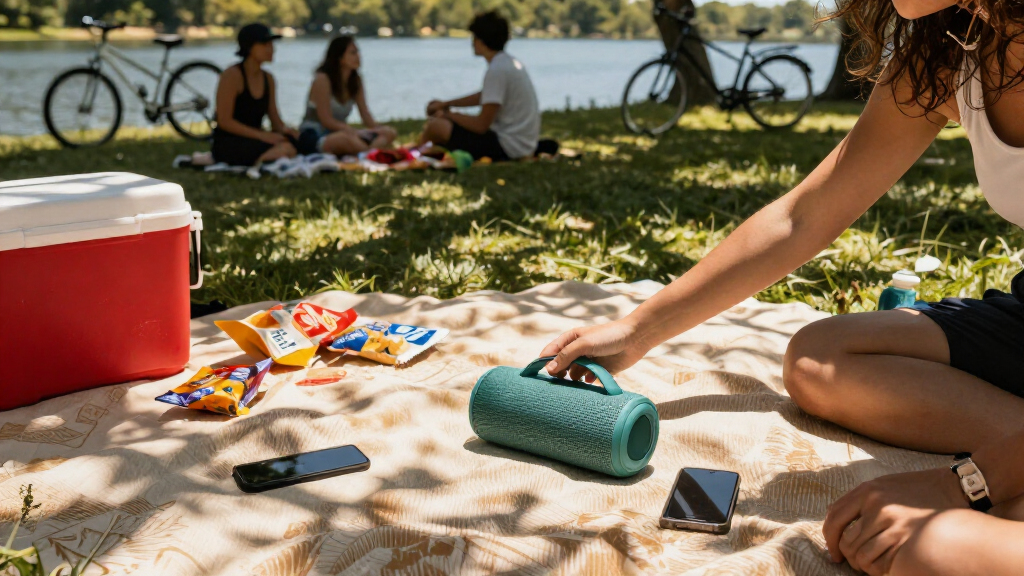
Set the speaker on a level, stable surface where it cannot easily fall, get stepped on, or be reached by splashing water. Point it toward the listeners if the design has a clear front, and avoid placing it inside a bag or behind dense objects. For a group, place it where people can hear it without putting it beside anyone’s head.
Tip:Try a few nearby positions at moderate volume. Walls or corners can change bass and reflections, while open areas may make sound seem quieter.
Check: Listeners can hear the audio clearly, and the speaker remains stable and away from likely water exposure.
Step 7: Manage playback and battery during use
Keep the phone within the speaker’s stated wireless range and lower the volume if you hear distortion or want longer battery life. Check the battery indicator during extended use. If the speaker gets wet, dusty, hot, or unusually quiet, pause playback and follow the manufacturer’s care instructions before continuing.
Tip:Cold conditions can reduce battery performance. Keep the speaker within its stated operating temperature range.
Check: Playback remains steady at a comfortable volume, and the battery has enough charge for the planned listening period.
Step 8: Disconnect, clean, and store the speaker
Stop playback and disconnect Bluetooth from your device or turn the speaker off. If the manufacturer allows it, wipe the exterior with a soft cloth and remove dust from controls and port covers. Let the speaker dry fully before closing covers or storing it, then put it away in a cool, dry place.
Tip:Avoid solvents, high-pressure water, and charging while damp unless the manual explicitly permits the method.
Check: The speaker is powered down, clean, dry, and stored with its ports protected as instructed.
Common Mistakes to Avoid
- Choosing a speaker based only on advertised loudness or battery life. — Match the speaker’s size, play-time estimate, sound, and protection features to the actual location and listening duration.
- Assuming water resistance means the speaker can be left in rain or submerged. — Check the exact rating and manual, and shelter the speaker from exposure outside its stated limits.
- Placing the speaker where it can fall, get splashed, or be blocked by objects. — Use a stable, open position directed toward listeners and away from foot traffic and water.
- Charging or storing the speaker while wet. — Follow the maker’s drying instructions and wait until the unit is fully dry before charging or sealing covers.
Troubleshooting
Problem: The speaker does not appear in Bluetooth settings.
Solution: Put the speaker in pairing mode, bring the phone close, and check whether it is already connected to another device. If needed, remove the old pairing from the phone and follow the manual’s reset or pairing steps.
Problem: Audio cuts out or sounds distorted.
Solution: Move the phone closer and away from obstacles, reduce volume, and check the battery. Reconnect Bluetooth and test from a different position.
Problem: The speaker does not turn on or charge.
Solution: Use a compatible cable and power source, inspect the port for moisture or debris, and consult the manual for charging indicators and reset steps. Do not charge a wet or visibly damaged unit.
Problem: Battery life is shorter than expected.
Solution: Lower the volume, disable unused pairing or lighting features if available, and compare actual use with the maker’s estimate. Temperature and battery age can affect run time.
What Success Looks Like
The speaker connects to the intended audio source, plays clearly from a stable outdoor position, and has enough charge for the planned session. You have checked its protection limits, kept it within those limits, and can clean and store it according to the manual.
Next Steps
Before each outing, check the battery, casing, cable, and port covers. After use, clean and dry the speaker as its maker directs. If your listening area or group size changes, reassess placement and whether a second compatible speaker would help. Replace damaged cables or seek manufacturer service if the unit will not charge, connect, or operate reliably.
Frequently Asked Questions
Can I use a portable Bluetooth speaker in the rain?
Only if the manufacturer’s stated rating and instructions cover the expected exposure. Use shelter when possible, and do not assume that water resistance permits submersion or charging while wet.
How far can my phone be from the speaker?
Bluetooth range varies by model and conditions. Check the product specifications, then keep the phone within range and avoid walls or other obstacles that can disrupt the connection.
How can I make the battery last longer outside?
Start with a full charge, use a moderate volume, turn off optional features you do not need, and keep the speaker within its stated temperature range.
Should I buy one speaker or a pair?
One speaker may suit a small area or portable use. A compatible pair can spread sound more widely, but check whether the model supports stereo or party pairing and whether both units need separate charging.