For cinematic beach shots, my best overall pick is the DJI Avata 2 Fly Smart Combo, which pairs an FPV flight setup with a camera-focused design for immersive movement. The CADDXFPV Gofilm 20 is a strong choice for pilots who want a compact FPV build and 4K/60FPS capture, while the DJI Avata 360 Fly More Combo stands out for reframing 360-degree footage after a flight. The main tradeoff is between a ready-to-fly experience, creative camera flexibility, and the extra skill and care needed to fly near wind, sand, and water. A small drone may be easier to carry, but it can be less suited to gusty shorelines than a more capable FPV setup. Continue reading for the full breakdown and a guide to choosing a kit that fits your beach-filming plans.

Get sports gear delivered free with Prime
- Fast, free delivery on millions of items
- Prime Video, Amazon Music and more included
- Member-only deals all year
Complete the kit


Key Takeaways
- DJI Avata 2 Fly Smart Combo leads for a conventional FPV-style cinematic workflow, while the Avata 360 options prioritize reframing from spherical footage.
- CADDXFPV Gofilm 20 is the lineup’s clearest compact camera-focused FPV pick, with 4K/60FPS capture; it is not the same all-in-one beginner proposition as a complete RTF kit.
- The CADDXFPV Protos RTF Kit and Tinyhawk Lite Adventure RTF Kit include goggles and a controller, which reduces setup uncertainty for buyers seeking a bundled entry point.
- The Antigravity A1 and DJI Avata 360 bundles center on 8K 360-degree imaging, offering more freedom to choose framing later but requiring a different editing workflow.
- The DJI Neo Motion kits favor portability and accessible operation over the wind-handling confidence and cinematic camera flexibility many exposed beach locations demand.
| CADDXFPV Protos FPV Drone RTF Kit with Walksnail Ascent VTX and Goggles | 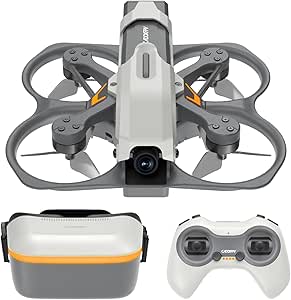 | Best Complete Starter Kit | Drone size: 1.6 inches | Drone weight: 100 g | Camera: 1/3-inch Starvis II sensor, 2 MP | VIEW ON AMAZON | See Our Full Breakdown |
| Tinyhawk Lite Adventure RTF FPV Drone Kit with Goggles and Controller |  | Best for Beginner Practice | Aircraft model: Tinyhawk Lite Adventure | Wheelbase: 115 mm | Dimensions: 148 × 144 × 45 mm | VIEW ON AMAZON | See Our Full Breakdown |
| DJI Avata 360 Fly More Combo (RC 2), 8K 360° Camera Drone |  | Best for Reframing Beach Footage | Camera resolution: 8K/60fps HDR | Camera format: 360° | Sensor size: 1-inch sensors | VIEW ON AMAZON | See Our Full Breakdown |
| CADDXFPV Gofilm 20 FPV Drone with 4K/60FPS Starlight Camera |  | Best Compact Cinewhoop | Camera resolution: 4K/60FPS | Field of view: 160° | Weight: 115 g | VIEW ON AMAZON | See Our Full Breakdown |
| DJI Avata 360 (RC 2) 8K 360° Camera Drone with Protection Kit |  | Best Protection Bundle | Camera resolution: 8K/60fps HDR | Camera format: 360° | Sensor size: 1-inch-equivalent sensors | VIEW ON AMAZON | See Our Full Breakdown |
| DJI Avata 360 Fly More Combo with RC 2 – 360° Drone with 8K Imaging and Dual Camera System |  | Best for Reframing Beach Footage | Camera: 8K HDR 360° and 4K60 dual-camera system | Obstacle sensing: Omnidirectional with nightscape support | Transmission range: Up to 12.4 miles | VIEW ON AMAZON | See Our Full Breakdown |
| Antigravity A1 Standard Bundle, 360 FPV Drone with 8K Camera for Beginners |  | Best Lightweight 360° Pick | Weight: 249g with standard battery | Flight time: Up to 39 minutes | Camera resolution: 8K | VIEW ON AMAZON | See Our Full Breakdown |
| DJI Neo Motion Fly More Combo Mini Drone with 4K UHD Camera | 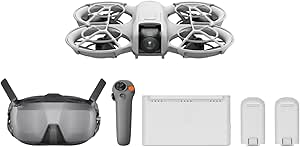 | Best for Casual Beach Creators | Weight: 135g | Video resolution: 4K UHD | Still image resolution: 12 MP | VIEW ON AMAZON | See Our Full Breakdown |
| DJI Avata 2 Fly Smart Combo with FPV Drone, Goggles N3, RC Motion 3, and Accessories |  | Best for Immersive FPV Passes | Camera sensor: 1/1.3-inch, 12 MP | Field of view: 155 degrees | Video recording: 4K/60fps HDR, 4K/100fps slow motion, 10-bit D-Log M | VIEW ON AMAZON | See Our Full Breakdown |
| DJI Neo 2 Motion Fly More Combo with RC Motion 3 & Goggles N3 |  | Best Compact Feature-Rich Kit | Weight: 151g | Dimensions: 6.74 × 5.8 × 1.59 in | Camera resolution: 12 MP | VIEW ON AMAZON | See Our Full Breakdown |
| fpv drone kit for cinematic beach shot | Weight | Camera resolution |
|---|---|---|
| CADDXFPV Protos FPV Drone RTF | — | — |
| Tinyhawk Lite Adventure RTF FP | Approximately 59 g, excluding battery | — |
| DJI Avata 360 Fly More Combo | — | 8K/60fps HDR |
| CADDXFPV Gofilm 20 FPV Drone w | 115 g | 4K/60FPS |
| DJI Avata 360 | — | 8K/60fps HDR |
| DJI Avata 360 Fly More Combo w | — | — |
| Antigravity A1 Standard Bundle | 249g with standard battery | 8K |
| DJI Neo Motion Fly More Combo | 135g | — |
| DJI Avata 2 Fly Smart Combo wi | — | — |
| DJI Neo 2 Motion Fly More Comb | 151g | 12 MP |
More Details on Our Top Picks
CADDXFPV Protos FPV Drone RTF Kit with Walksnail Ascent VTX and Goggles
Ready-to-fly completeness is the Protos’s main advantage for beach learners: goggles, controller, and three batteries come in the box, so you can practice short flights without assembling a separate system. Its 1080p goggles and three flight modes make the FPV view accessible, while Position Hold and Self-Stabilizing modes offer a gentler starting point than Manual. Compared with the Tinyhawk Lite Adventure, the Protos provides a stated 2 MP camera and a more turnkey kit, though the Tinyhawk is lighter. Neither is a strong choice for polished cinematic footage: the Protos records only up to 1080p, and its plastic 1.6-inch frame is better suited to learning close-range passes than expansive coastline scenes. The listed 150 m ± 50 m control distance also matters more at the beach than its much longer video-link range. Bring a compatible charger; the charging butler is included, but its charger is not.
Pros:- Includes goggles, controller, and three drone batteries for a ready-to-fly setup.
- Three flight modes give beginners a more supported path toward Manual flying.
- 1080P/60FPS goggles with listed 30 ms latency provide a clear, responsive FPV view.
- Compact 100 g body is easier to carry than a larger filming rig.
Cons:- Camera capture tops out at 1080p, limiting detail and cropping flexibility for cinematic edits.
- Recommended RC control distance is approximately 150 m ± 50 m, despite the longer video-link range.
- Charging butler is supplied without its charger.
Best for: New FPV pilots who want goggles, controller, and several batteries in one kit for practicing controlled beach flights.
Not ideal for: Filmmakers seeking high-resolution footage of surf and shoreline, or pilots who need dependable control far beyond the listed approximate 150 m range.
- Drone size:1.6 inches
- Drone weight:100 g
- Camera:1/3-inch Starvis II sensor, 2 MP
- Video capture:1080p, 720p
- Goggles display:1080P/60FPS
- Flight modes:Position Hold, Self-Stabilizing, Manual
- Batteries and flight time:Three 840 mAh batteries; up to 10 minutes each
- Recommended RC control distance:Approximately 150 m ± 50 m
Our verdict“Choose the Protos to learn FPV with a mostly complete kit, not to capture high-detail cinematic beach footage.”
Tinyhawk Lite Adventure RTF FPV Drone Kit with Goggles and Controller
The Tinyhawk Lite Adventure is the lightweight practice pick here, aimed at people learning to steer an FPV drone rather than producing finished beach films. Its roughly 59 g weight, brushed motors, and ready-to-fly goggles-and-controller bundle make it less intimidating to carry and learn with than the CADDXFPV Protos. The onboard camera and VTX deliver a real-time view for piloting, but the supplied specs do not establish a high-resolution recording capability, so I would not choose it for detailed sunset or surf footage. Its 1S 850 mAh battery also means beach sessions may involve frequent swaps or charging; the Protos, by contrast, includes three batteries with up to 10 minutes each. The Tinyhawk’s 400 mW VTX option is useful on paper, but first-time setup and configuration can add friction before the first flight. Think training tool, not camera drone.
Pros:- Approximately 59 g aircraft weight makes it a notably light practice option.
- Goggles and controller are included for an FPV learning setup.
- Onboard ELRS receiver and adjustable 40-channel VTX provide useful system options.
- Brushed-motor design and beginner-focused positioning suit basic flight practice.
Cons:- Camera specifications do not establish high-resolution recording for cinematic edits.
- Single 1S 850 mAh battery can limit time between charging or battery changes.
- First-time assembly and setup may be less straightforward than the Protos ready-to-fly bundle.
Best for: First-time FPV pilots who want a light, goggle-based learning setup for short practice flights near the beach.
Not ideal for: Content creators who need specified high-resolution onboard recording, longer sessions between battery changes, or a kit that requires little setup.
- Aircraft model:Tinyhawk Lite Adventure
- Wheelbase:115 mm
- Dimensions:148 × 144 × 45 mm
- Weight:Approximately 59 g, excluding battery
- Motor:1020 Coreless Cup DC3.7V
- Receiver:Onboard ELRS, 2.4G
- VTX:40-channel; 0/25/100/400 mW options
- Battery:1S HV 850 mAh
Our verdict“Pick the Tinyhawk Lite Adventure for learning FPV on a light aircraft, and skip it if recorded beach footage is the main goal.”
DJI Avata 360 Fly More Combo (RC 2), 8K 360° Camera Drone
For cinematic beach shots where framing may change after the flight, the Avata 360’s 8K/60fps HDR 360° capture has a different advantage from the conventional FPV cameras on the Protos and Gofilm 20: it gives editors room to select a view from the recorded sphere. Its included three batteries and charging hub also suit longer shore sessions better than the Gofilm 20’s listed 5.5-minute hover time. Omnidirectional obstacle sensing adds support when flying near beach structures, though it does not replace careful piloting around people, birds, or changing conditions. This is the most capable option here for flexible post-flight composition, but the supplied specs do not state its aircraft weight or flight time, making portability and session planning harder to judge. App access is another practical wrinkle: DJI Fly must be obtained outside Google Play on compatible Android devices.
Pros:- 8K/60fps HDR 360° capture allows flexible view selection during editing.
- Includes three batteries and a charging hub for a more extended shooting kit.
- Omnidirectional obstacle sensing supports safer navigation around obstacles.
- 1080p/60fps video transmission is specified up to 20 km.
Cons:- DJI Fly is not available through Google Play, which may complicate setup on some Android devices.
- The supplied product data does not specify aircraft weight or flight time for travel and session planning.
- 360° footage and app setup may be more involved than recording a straightforward FPV view with the Gofilm 20.
Best for: Beach filmmakers who want to reframe aerial footage after flying and value high-resolution 360° capture over a simple analog FPV setup.
Not ideal for: Pilots who want a lightweight, low-complexity learning kit or who cannot install DJI Fly through the available download route on their device.
- Camera resolution:8K/60fps HDR
- Camera format:360°
- Sensor size:1-inch sensors
- Video transmission:1080p/60fps, up to 20 km
- Obstacle sensing:Omnidirectional with nightscape
- Included controller:DJI RC 2
- Included batteries:Three
- Other included accessories:Charging hub, sling bag
Our verdict“Choose this combo if editable 8K 360° beach footage matters more than a minimal, easy-to-configure FPV kit.”
CADDXFPV Gofilm 20 FPV Drone with 4K/60FPS Starlight Camera
The Gofilm 20 is the most direct match here for a pilot who wants to make conventional FPV footage rather than reframe a 360° recording. Its 4K/60FPS camera, wide 160° view, and EIS plus Gyroflow support give editors more room to smooth and crop footage than the 1080p Protos. The 360° protective guards and 115 g frame are useful for close, controlled passes where bumps are a concern, though guards do not make flying over people or near wildlife safe. Against the DJI Avata 360, it gives up 8K 360° flexibility and obstacle sensing, but its compact cinewhoop format is more focused on a single FPV camera view. The tradeoff is short sessions: listed hover time is 5.5 minutes, and 4K recording needs a high-speed microSD card that is not included. Plan batteries and storage before heading out.
Pros:- 4K/60FPS recording offers more detail than the Protos’s 1080p capture.
- EIS and Gyroflow support provide options for smoothing footage in-camera or in editing.
- 360° guards help protect the aircraft during close, controlled practice.
- Compact 115 g build supports a portable cinewhoop setup.
Cons:- Listed hover time is 5.5 minutes, requiring frequent battery changes for a beach session.
- High-speed microSD card required for 4K recording is not included.
- Unlike the DJI Avata 360 combo, the supplied package data does not list goggles, controller, or batteries.
Best for: FPV pilots who want a compact, guarded cinewhoop for direct 4K beach passes and are comfortable managing short flights and stabilization workflow.
Not ideal for: Beginners seeking a complete goggles-and-controller kit, or filmmakers who need long uninterrupted takes and included 4K storage.
- Camera resolution:4K/60FPS
- Field of view:160°
- Weight:115 g
- Wheelbase:94 mm
- Video stabilization:EIS and Gyroflow support
- Video transmission latency:As low as 22 ms average
- Battery compatibility:2–4S
- Flight time:5.5 minutes hover time
- Storage requirement:High-speed microSD card required for 4K recording; not included
Our verdict“Choose the Gofilm 20 for compact, stabilized 4K FPV passes if you can supply the recording card and plan around short flights.”
DJI Avata 360 (RC 2) 8K 360° Camera Drone with Protection Kit
This Avata 360 package pairs 8K/60fps HDR 360° capture with impact guards, landing gear, and travel pouches, making it the more protected and travel-oriented choice compared with the Fly More Combo’s listed sling bag and charging hub. Like that combo, it offers omnidirectional obstacle sensing and post-flight framing flexibility—useful when a shoreline composition is hard to judge from a moving aircraft. The supplied bundle data, however, lists one intelligent flight battery rather than three, so it is less prepared for extended filming than the Fly More Combo. It also shares the DJI Fly app access complication and does not specify aircraft weight or flight time here. Compared with the Gofilm 20, this model favors high-resolution 360° editing and sensing over a compact, direct-view cinewhoop workflow. Choose it for the protection accessories, not for the longest beach session.
Pros:- 8K/60fps HDR 360° capture gives substantial flexibility when choosing a final composition.
- Omnidirectional obstacle sensing is specified for flight support around obstacles.
- Impact guards and landing gear add protection for transport and handling.
- Two storage pouches and a controller neck strap support travel organization.
Cons:- The listed bundle includes one intelligent flight battery, fewer than the three in the Fly More Combo.
- DJI Fly requires a download route outside Google Play, which may create app compatibility friction.
- The supplied data does not state aircraft weight or flight time.
Best for: Traveling creators who want 8K 360° beach footage and value included impact guards, landing gear, and storage pouches.
Not ideal for: Filmmakers planning extended shooting sessions without extra batteries, or Android users unable to install DJI Fly outside Google Play.
- Camera resolution:8K/60fps HDR
- Camera format:360°
- Sensor size:1-inch-equivalent sensors
- Video transmission:1080p/60fps, up to 20 km
- Obstacle sensing:Omnidirectional
- Included battery:One intelligent flight battery
- Protection features:Impact guards, landing gear
- Travel accessories:Remote controller neck strap, two storage pouches
Our verdict“Pick this Avata 360 bundle for protected, travel-ready 8K 360° filming, but choose the Fly More Combo for more listed batteries.”
DJI Avata 360 Fly More Combo with RC 2 – 360° Drone with 8K Imaging and Dual Camera System
For cinematic beach shots that may need a new angle after landing, the Avata 360’s 8K HDR 360° capture gives editors room to choose framing from the recorded scene. Its dual-camera system also lists 4K60, making it more versatile for conventional aerial clips than the DJI Avata 2 Fly Smart Combo, whose listed camera focuses on a 155-degree view rather than full 360° capture. Omnidirectional sensing adds support around obstacles, but it does not remove the need to watch wind, people, and shoreline conditions. Three batteries and a charging hub are useful for extending a beach shoot, while the broad accessory bundle reduces extra packing. The tradeoff is complexity: beginners may find its advanced modes harder to manage, and the listed Google Play compatibility issue could complicate setup for some Android users.
Pros:- 8K HDR 360° recording allows multiple compositions from a single capture.
- 4K60 dual-camera capability adds a conventional footage option.
- Omnidirectional obstacle sensing supports awareness around the drone.
- Three batteries, charging hub, backpack, and other accessories suit longer outings.
Cons:- Advanced features may create a steep learning curve for first-time pilots.
- The listed DJI Fly app compatibility issue on Google Play may complicate Android setup.
- The feature set may be excessive for casual beach clips.
Best for: Aerial creators who want to reframe beach scenes in post and can manage an advanced 360° camera workflow.
Not ideal for: Casual pilots or Android users who need a simple setup and do not need 360° footage.
- Camera:8K HDR 360° and 4K60 dual-camera system
- Obstacle sensing:Omnidirectional with nightscape support
- Transmission range:Up to 12.4 miles
- Batteries:3 Intelligent Flight Batteries
- Memory card:SanDisk 128GB Extreme microSD
- Included accessories:RC 2, charging hub, backpack, spare propellers, landing pad, cleaning kits, and more
- Warranty:CPS 2 Year
Our verdict“Choose this if post-flight reframing and a substantial battery bundle matter more than a simple beginner workflow.”
Antigravity A1 Standard Bundle, 360 FPV Drone with 8K Camera for Beginners
The Antigravity A1 pairs 8K 360° capture with a 249g standard-battery weight, a useful combination for beach creators who want immersive footage without carrying a larger kit. Its stated flight time of up to 39 minutes gives it a stronger listed endurance figure than the DJI Avata 2 Fly Smart Combo, though the products use different camera approaches: the A1 records all-around footage, while Avata 2 offers a wide forward view and 4K slow motion. Omnidirectional avoidance, intelligent framing, and automatic editing may help newcomers get from flight to shareable clips. Still, the range of modes can be a lot to learn, and the provided information does not specify a full accessory bundle. Choose it for flexible 360° composition, not for the simplest possible first flight.
Pros:- 8K 360° footage gives broad freedom to select framing after capture.
- 249g standard-battery weight supports a portable kit.
- Up to 39 minutes of stated flight time can reduce interruptions between takes.
- Automatic editing and intelligent framing may speed up sharing.
Cons:- Multiple flight modes and 360° workflows may overwhelm complete beginners.
- The available details do not clearly enumerate included accessories.
- The listed 90° field of view with Vision Goggles may not suit every immersive viewing preference.
Best for: Traveling beach filmmakers seeking a lightweight 360° drone with long stated flight time and editing aids.
Not ideal for: Pilots who want a very straightforward camera drone or need clearly specified bundle accessories before buying.
- Weight:249g with standard battery
- Flight time:Up to 39 minutes
- Camera resolution:8K
- Field of view:90° FOV with Vision Goggles
- Obstacle avoidance:Omnidirectional with front and downward vision
- Battery options:Standard and high-capacity
- Control modes:FreeMotion and FPV
- App features:Auto editing and intelligent framing
Our verdict“Pick the A1 if low carry weight and 360° reframing matter more than a minimal learning curve.”
DJI Neo Motion Fly More Combo Mini Drone with 4K UHD Camera
The DJI Neo prioritizes approachable, lightweight filming over the immersive image options offered by the DJI Avata 360 Fly More Combo. At 135g, it is easy to pack for a shoreline walk, and palm takeoff and landing can make quick clips less dependent on finding a clear launch surface. Its stabilized 4K video, subject tracking, and eight QuickShots modes suit simple follow-along scenes and repeatable social clips. The included goggles and motion controller add an FPV option, but this is not the strongest choice for pilots whose main goal is dramatic, high-speed cinematic passes. There is also no flight-time figure in the supplied specs, so planning a long shoot is harder; wind resistance is listed at Level 4, a meaningful limitation for exposed beaches where gusts can disrupt smooth footage.
Pros:- 135g body is easy to carry on beach outings.
- Palm takeoff and landing support quick launches in suitable conditions.
- Subject tracking and eight QuickShots modes simplify short creative clips.
- Combo includes RC Motion 3, Goggles N3, three batteries, and a charging hub.
Cons:- The supplied specifications do not state flight time.
- Level 4 wind resistance may limit use on breezy, exposed beaches.
- 4K UHD lacks the 8K 360° reframing available from the Avata 360 and Antigravity A1.
Best for: Casual beach travelers who want a compact 4K drone for short tracked clips and easy takeoffs.
Not ideal for: Filmmakers planning extended sessions or exposed, windy shoreline flights who need documented endurance and stronger wind capability.
- Weight:135g
- Video resolution:4K UHD
- Still image resolution:12 MP
- Battery capacity:1435 mAh
- Maximum range:10 km
- Wind resistance:Level 4
- Dimensions:6.18 × 5.12 × 1.91 in
- Included accessories:RC Motion 3, Goggles N3, three batteries, and charging hub
Our verdict“Choose the Neo for portable, straightforward 4K beach clips, but skip it if wind tolerance or documented long-session endurance is a priority.”
DJI Avata 2 Fly Smart Combo with FPV Drone, Goggles N3, RC Motion 3, and Accessories
The Avata 2 is the more direct pick for flying through a beach scene: its 155-degree camera, goggles, and motion controller center the experience on an immersive forward view rather than the post-capture reframing of the Antigravity A1. For planned passes over open sand or water, 4K/60 HDR and 4K/100 slow motion offer useful options for polished movement and slowed action. A built-in propeller guard is a practical benefit for close-range flying, though it is not a substitute for keeping clear of people, birds, and obstacles. The supplied flight time is approximately 23 minutes, and this combo lists one battery, so the session may be brief compared with the three-battery DJI Neo Motion Fly More Combo. Setup and visual-positioning limits also make it less suited to beginners or every shoreline environment.
Pros:- 4K/60 HDR and 4K/100 slow motion give flexibility for cinematic movement.
- 155-degree field of view supports an expansive FPV perspective.
- Goggles N3 and RC Motion 3 provide an immersive control setup.
- Built-in propeller guard adds protection for close-range flying.
Cons:- Approximately 23 minutes of flight time and one included battery limit session length.
- Setup may be challenging for beginners.
- Visual positioning system limits suitability in some environments.
Best for: FPV pilots who want an immersive wide-angle view and slow-motion options for controlled beach passes.
Not ideal for: First-time flyers, creators seeking 360° reframing, or anyone planning long sessions without spare batteries.
- Camera sensor:1/1.3-inch, 12 MP
- Field of view:155 degrees
- Video recording:4K/60fps HDR, 4K/100fps slow motion, 10-bit D-Log M
- Flight time:Approximately 23 minutes
- Transmission range:Up to 13 km (FCC)
- Live view:1080p/100fps with DJI O4 system
- Battery:One DJI Avata 2 Intelligent Flight Battery
- Included accessories:Goggles N3, RC Motion 3, landing pad, tools, and extended warranty
Our verdict“Choose the Avata 2 for wide, immersive FPV passes and slow motion, provided you can manage its setup and short single-battery session.”
DJI Neo 2 Motion Fly More Combo with RC Motion 3 & Goggles N3
The Neo 2 Motion Fly More Combo brings obstacle sensing and gesture control to a compact 151g frame, making it a practical choice for beach visitors who want more automated help than the basic portability of the DJI Neo Motion Fly More Combo. Its listed 4K video and 12 MP camera cover everyday aerial clips, while ActiveTrack and SelfieShot are geared toward keeping a subject in frame without constant control input. Goggles N3 and RC Motion 3 add an FPV route, though the supplied specs do not state flight time or identify the number of included batteries. That makes it harder to plan a full day of filming than with the Neo bundle, which explicitly lists three batteries. Its strongest case is convenience and sensing; buyers seeking 360° post-production framing should look instead at the Avata 360 or Antigravity A1.
Pros:- 151g design is portable for outings along the shoreline.
- Omnidirectional obstacle sensing adds awareness during flight.
- Gesture control, ActiveTrack, and SelfieShot support hands-free capture.
- 4K video is paired with RC Motion 3 and Goggles N3.
Cons:- The supplied specifications do not include flight time.
- The number of included batteries is not specified.
- 4K framing is less flexible in post than the 8K 360° Avata 360 and Antigravity A1.
Best for: Beach travelers who want a compact 4K drone with automated subject features, obstacle sensing, and an FPV accessory setup.
Not ideal for: Creators who need known flight endurance, clearly specified battery quantity, or 360° footage for reframing.
- Weight:151g
- Dimensions:6.74 × 5.8 × 1.59 in
- Camera resolution:12 MP
- Video resolution:4K
- Battery capacity:1606 mAh
- Maximum range:10 km
- Connectivity:Bluetooth and Wi-Fi
- Special features:Omnidirectional obstacle sensing, gesture control, ActiveTrack, and SelfieShot
Our verdict“Pick the Neo 2 for a portable, feature-rich 4K kit with automated capture, but not for buyers who need clear battery planning or 360° footage.”

How We Picked
I ranked these kits around the actual demands of beach filming: camera flexibility, usable flight experience, kit completeness, portability, and how manageable each choice is for its likely buyer. For shoreline footage, camera resolution alone does not settle the choice; wind, salt spray, loose sand, recovery risk, and the ability to frame a moving subject all affect whether a drone is practical. I gave more weight to options that combine an approachable FPV workflow with a clear filming advantage, while noting where 360-degree capture, compact size, or a bundled controller changes the use case.
The order reflects those differences rather than treating every camera drone as an interchangeable FPV kit. The Avata 2 ranks first as the strongest balance for conventional FPV cinematic movement, while the Gofilm 20 and Avata 360 bundles serve more specialized filming priorities. RTF and motion-control kits earn their place through accessibility or convenience, but small size and beginner-friendly packaging do not automatically make a drone a good match for gusty, sandy beaches. Product details and bundle contents can vary, so I would check the exact included goggles, controller, batteries, and protection accessories before choosing.
Factors to Consider When Choosing Fpv Drone Kit For Cinematic Beach Shots
Choosing an FPV kit for the coast is not just a camera decision. I would match the drone to the kind of shot, the conditions I expect to fly in, and how much setup and editing I want to manage afterward.
Match the camera format to the shot you want
Decide whether your priority is a direct FPV view, a conventional forward-facing cinematic image, or footage you can reframe after flight. A 360-degree camera can help when the action moves unpredictably because you can select a view later, but it adds an editing step and does not remove the need to plan the flight safely. A standard camera workflow is often simpler when you already know the intended framing. Buyers sometimes focus on the largest resolution number and overlook lens perspective, stabilization, and editing compatibility. Think about whether you will deliver wide scenic passes, close subject tracking, or flexible social clips before paying for camera features you may not use.
Treat wind and salt as operating limits
Beach air can change quickly, and a compact drone may be pushed around more than a larger setup in gusts. Check the maker’s wind guidance and local flight restrictions, then leave a generous margin rather than planning a long return over water. Salt mist and sand can reach motors, camera mechanisms, connectors, and batteries even when the drone never lands on the beach. A common mistake is to assume a water-adjacent filming location is safe just because conditions look calm from shore. Plan a dry launch and landing area, keep distance from spray, and follow the manufacturer’s cleaning and storage advice after coastal flights.
Choose a kit around your control comfort
Bundled goggles and controllers reduce the guesswork of assembling a working FPV setup, but the control method still matters. Traditional sticks give pilots direct manual control and room to develop precise lines, while motion controllers can feel more accessible to people new to FPV. Neither approach removes the need to learn orientation, braking, and recovery before flying near people or water. Avoid buying a kit solely because it says ready-to-fly; verify which components are included and whether the package fits the intended flight mode. If you expect to progress into manual flying, check that the ecosystem supports the controls and learning path you want.
Budget for batteries, recovery, and maintenance
Beach filming often involves repeated takes, and one included battery may not cover a session with travel, setup, and retakes. Compare the practical contents of each bundle, including batteries, charging equipment, propellers, and guards, rather than assuming a combo name guarantees the same accessories. Sand can abrade moving parts, while a rough landing may turn a small repair into a missed filming day. Set aside time and supplies for inspection and cleaning, and learn how to check propellers and motors before flying again. Spending more on a bundle makes sense when its added equipment solves a real session need, not merely because it contains more pieces.
Plan the edit before you fly
Camera capability only helps if the resulting files fit your editing setup and delivery needs. High-resolution or 360-degree footage can take more storage and computing resources, so check your device capacity and editing software before committing to that workflow. A useful beach sequence usually benefits from a few deliberate passes and a clear subject, rather than collecting long clips with no planned edit. Beginners may get more usable results from a simpler camera workflow and stable, repeatable flight paths than from the most flexible capture format. Decide whether you need quick sharing, detailed color work, or freedom to reframe before choosing the camera system.
Frequently Asked Questions
Is a 360-degree FPV drone a better choice than a standard camera drone for beach footage?
It can be, if you value the freedom to choose the final viewing direction after the flight or want to create several crops from one pass. That flexibility brings larger editing and file-management demands, so it may slow down a simple shoot. A standard camera is usually easier when you already know the composition and want a direct path from flight to edit. For moving subjects or unpredictable action, 360 capture can give you more framing options, but it does not make flying over water less risky. Choose based on your editing habits as much as the camera specification.
Can a compact beginner drone handle an open, windy beach?
Not every compact drone is suited to exposed shoreline conditions, and small size alone does not indicate wind tolerance. Check the manufacturer’s stated operating limits and avoid launching when gusts approach them. Wind can also change direction during a flight, making a return trip harder than the outward leg. A sheltered area may be better for learning controls before attempting open coastal shots. If reliable footage in breezy conditions is central to your plan, prioritize documented flight capability over convenience or portability.
Do I need an RTF kit if I am new to FPV?
An RTF package can simplify the first purchase by grouping core components such as a drone, goggles, and controller. It does not replace learning the controls or checking that the included equipment suits your preferred flight mode. Compare the exact contents, since similarly named bundles may include different accessories or battery counts. New pilots should also plan for practice away from crowds and water, where mistakes carry less risk. If you expect to upgrade components later, check compatibility before treating a complete bundle as the only factor.
What should I do to protect an FPV drone after a beach flight?
Keep the drone away from sand and salt spray during launch and landing, then follow its manufacturer’s cleaning instructions after the flight. Inspect propellers, motors, vents, and battery contacts for grit or residue before storing the kit. Avoid using cleaning methods that could push debris farther into the aircraft or damage seals and electronics. Dry storage and careful handling help limit corrosion risks, but they cannot make a drone waterproof or sandproof. If the aircraft gets wet or visibly contaminated, consult the manufacturer’s guidance before powering it again.
Which matters more for cinematic beach shots: 8K capture or stable, controllable flight?
For most buyers, a controllable flight and footage that remains steady and well-framed matter more than the largest resolution label. Higher-resolution capture can help with reframing or cropping, but it may demand more storage and editing power. At the coast, a missed composition or a flight cut short by wind cannot be fixed by extra pixels. Consider how the camera stabilizes footage and whether the drone’s controls fit your ability to repeat a smooth path. Choose 8K when its editing flexibility serves a clear purpose, not as a stand-in for flight planning.
Conclusion
My best overall recommendation is the DJI Avata 2 Fly Smart Combo for buyers who want a recognizable FPV filming setup with a clear cinematic role. For best value in a compact camera-focused FPV option, I would shortlist the CADDXFPV Gofilm 20, while remembering that its kit format differs from a complete RTF bundle. The best premium-style choice for reframing is the DJI Avata 360 Fly More Combo; choose the Antigravity A1 if its 360-degree approach and beginner positioning better suit your workflow. The best beginner picks are the Tinyhawk Lite Adventure RTF Kit or the bundled DJI Neo Motion options for buyers who value a ready-to-use package and portability, not exposed-wind performance. For a bundled FPV setup built around Walksnail, the CADDXFPV Protos RTF Kit is the specific pick; for any beach shoot, I would make local flight rules, wind limits, and distance from people and water part of the decision.
Fall Picks

Theragun Mini 3rd Generation Massage Gun – Travel Essential (Black)
As an affiliate, we earn on qualifying purchases.